Choosing between an SSD and an HDD is one of the most important decisions when buying or upgrading a computer. Storage affects everything from startup speed to file transfers and overall system performance.
Many people see these terms while shopping for laptops and desktops but are not sure what they mean. If you want a faster and smoother experience, understanding the difference can help you make the right choice.
This guide explains SSD and HDD technology in simple terms and helps you decide which option is best for your needs in 2026.
Understanding SSD and HDD
Before comparing them, it helps to understand how each storage type works.
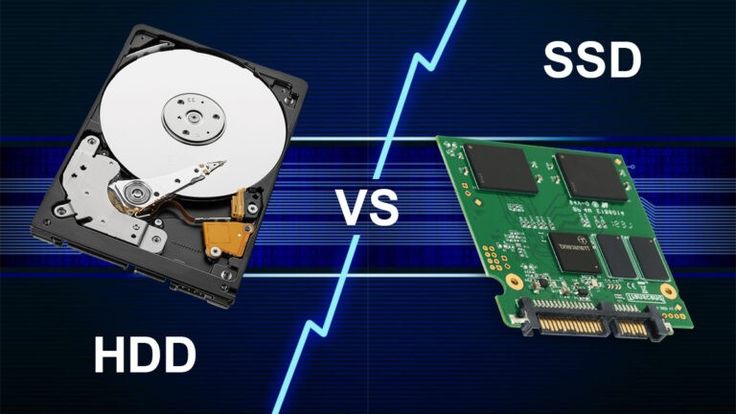
An HDD stores data on spinning magnetic disks. It uses a mechanical arm to read and write information.
An SSD stores data on memory chips. Since there are no moving parts, information can be accessed much faster.
Although both perform the same basic function, their performance differs significantly.
What Is an HDD?
HDD stands for Hard Disk Drive.
This technology has been used in computers for decades and remains popular because it offers large storage capacity at a lower cost.
Advantages of HDD
- Lower price per gigabyte
- Large storage options
- Widely available
- Good for archiving files
Many people still use HDDs to store movies, photos, backups, and large collections of files.
Disadvantages of HDD
- Slower performance
- Mechanical parts can wear out
- Longer boot times
- More heat generation
- Higher power consumption
These limitations become noticeable during everyday tasks.
What Is an SSD?
SSD stands for Solid State Drive.
Unlike traditional hard drives, SSDs use flash memory technology.
Because there are no moving components, data can be accessed much more quickly.
Advantages of SSD
- Faster startup times
- Quick application launches
- Better multitasking
- Lower power usage
- Silent operation
- Greater durability
For most users, the speed difference is immediately noticeable.
Disadvantages of SSD
- Higher cost compared to HDD
- Large capacities can be expensive
Despite the higher price, SSDs have become increasingly affordable over recent years.
SSD vs HDD Speed Comparison
Speed is the biggest reason people choose SSDs.
A computer with an SSD feels much faster during everyday use.
Tasks That Benefit From SSD Speed
- Booting Windows
- Opening applications
- Copying files
- Installing software
- Web browsing
- Gaming
For example, a laptop using an SSD may start in less than twenty seconds, while an older HDD system could take over a minute.
This difference becomes even more noticeable when multitasking.
SSD vs HDD for Gaming
Gamers often ask which storage option is better.
While storage does not directly increase frame rates, it affects loading times and overall responsiveness.
SSD Benefits for Gaming
- Faster game loading
- Quicker updates
- Reduced waiting times
- Better open world performance
Large modern games often load significantly faster from SSD storage.
HDD Benefits for Gaming
- Lower cost
- More storage for game libraries
Gamers with large collections sometimes use both SSD and HDD storage together.
Reliability Comparison
Storage reliability matters because your files are valuable.
No storage device lasts forever, but SSDs and HDDs fail in different ways.
Why SSDs Are Often More Reliable
Since SSDs contain no moving parts, they are less vulnerable to physical damage.
This makes them especially useful for laptops that are frequently moved around.
HDD Reliability Considerations
Hard drives contain mechanical components that wear down over time.
A dropped laptop can sometimes damage an HDD instantly.
For portable devices, SSDs generally provide better durability.
Storage Capacity Differences
Capacity remains one area where HDDs continue to offer strong value.
Typical HDD Capacities
- 1TB
- 2TB
- 4TB
- 8TB
- 16TB and higher
Typical SSD Capacities
- 256GB
- 512GB
- 1TB
- 2TB
- 4TB
While SSD capacities continue growing, large SSDs are still more expensive.
Cost Comparison in 2026
Budget plays an important role when choosing storage.
HDD Pricing Advantages
HDDs generally offer:
- More storage for less money
- Affordable backup solutions
- Better value for large archives
SSD Pricing Advantages
Although SSDs cost more, they provide:
- Better performance
- Improved user experience
- Longer battery life in laptops
Many users consider the speed benefits worth the additional investment.
Which Is Better for Students?
Students often need reliable storage for assignments, projects, and online learning.
An SSD usually provides the best experience because it makes laptops faster and more responsive.
Benefits include:
- Faster startup
- Better multitasking
- Improved productivity
- Longer battery efficiency
For academic work, speed often matters more than maximum storage capacity.
Which Is Better for Business Users?
Business professionals rely on efficiency.
Waiting for files and applications to load can reduce productivity throughout the day.
SSD storage helps by:
- Reducing delays
- Improving workflow
- Supporting multitasking
- Enhancing reliability
Most modern business laptops now include SSD storage as standard.
Best Storage Option for Content Creators
Video editors, photographers, and designers often work with large files.
A combination approach can be ideal.
Recommended Setup
- SSD for operating system and active projects
- HDD for long term storage and backups
This setup balances speed and storage capacity effectively.
Hybrid Storage Solutions
Many users no longer choose between SSD and HDD.
Instead, they use both.
Common Configuration
- SSD for Windows and applications
- HDD for photos, videos, and archives
This provides the speed of SSD storage while maintaining affordable high capacity storage.
Signs It Is Time to Upgrade From HDD to SSD
If you still use a traditional hard drive, watch for these signs:
- Slow startup times
- Delayed application launches
- Frequent freezing
- Long file transfer times
- Overall sluggish performance
Upgrading to an SSD often feels like upgrading the entire computer.
Installation Considerations
Before purchasing new storage, check compatibility.
Important factors include:
- Available drive slots
- Storage interface support
- Laptop size limitations
- Motherboard compatibility
Researching compatibility beforehand helps avoid installation issues.
Future of Computer Storage
Storage technology continues improving every year.
SSDs are becoming faster, more affordable, and available in larger capacities.
As prices continue to fall, SSD adoption is expected to increase even further.
Traditional hard drives will likely remain useful for large scale storage, backups, and archival purposes.
Need Help Choosing the Right Upgrade?
Storage upgrades can be confusing if you are unfamiliar with hardware specifications.
If you need help selecting the right storage solution for your device, feel free to reach out to us and we will be happy to assist.
Frequently Asked Questions
Is SSD better than HDD for everyday use?
Yes. SSDs provide faster startup times, quicker application launches, and smoother overall performance. Most users notice an immediate improvement after switching from an HDD to an SSD.
Can an SSD make an old laptop faster?
Absolutely. Replacing an HDD with an SSD is one of the most effective upgrades for an older laptop. Many users experience dramatically faster boot times and improved responsiveness.
Why are SSDs more expensive than HDDs?
SSDs use advanced flash memory technology that costs more to manufacture. However, they offer significantly better performance, reliability, and efficiency than traditional hard drives.
Is HDD still worth buying in 2026?
Yes, especially for large storage needs and backups. HDDs remain cost effective for storing large amounts of data that do not require fast access speeds.
How long does an SSD last?
Most modern SSDs can last many years under normal use. Their lifespan depends on usage patterns, but quality SSDs are designed to handle large amounts of data writing over time.
Should I use both SSD and HDD together?
Many users find this combination ideal. An SSD can handle the operating system and frequently used applications, while an HDD stores large files, backups, and media collections. This setup offers both speed and capacity.